 Site Connect
Every job site, in one place
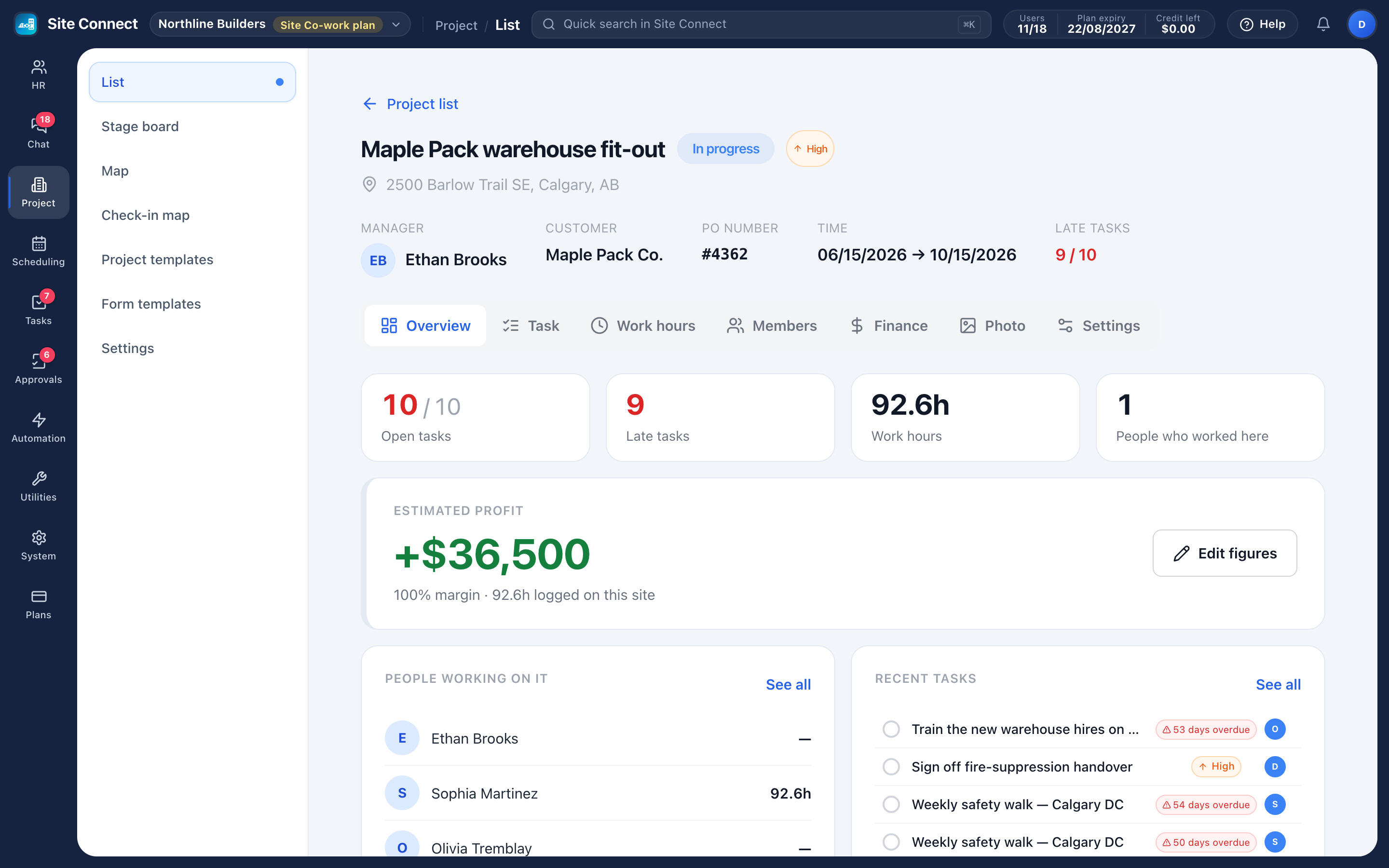
A project is a job site: its address, team and stage, the tasks your crew does there, the hours they log when they check in, the photos they take and the money the job brings in.
Address and radius
Each project has its address with directions, and its own check-in radius around it.
Stage board
Projects as cards in columns, one per stage — drag a card to move the job along.
Two maps
The project map shows where every job site is; the check-in map shows where each check-in actually happened.
The money side
Contract value, invoiced, labour cost from hours and rates, and estimated profit — for the people allowed to see pay.
Inside a project
Each project page shows open and late tasks, hours against plan, who has worked there and the latest site photos. Hours come from check-ins on the project's tasks, so nobody types them in a second time.
- Work hours by person and by week
- Members appear by themselves: anyone given a task or checking in on the project
- Check-in settings per project: radius, check-in away allowed or refused, location required, check-in days and forms
- Project templates for jobs you run again and again
Labour cost without a spreadsheet
Give each person an hourly cost and every checked-out hour on a task is costed at the rate in effect that day. The Finance tab adds approved expense requests for the project and compares it all with the contract value.
- Rates can be hourly or yearly, each with its own effective date
- Changing a rate later never changes the cost of work already done
- Contract and invoice amounts are entered by hand — they are not linked to accounting software
- Finance and labour cost are shown only to admins and people with the HR reports permission
How teams set this up
- Create a project with its address, team and stage.
- Turn on check-in for the project and set the radius.
- Add tasks, or create the project from a template.
- Follow hours, photos and cost on the project page.
Frequently asked
Does every project need an address?
You choose: off, optional or required, in Project settings. Without an address there is nothing to measure check-in distance against.
Is the Finance tab linked to our accounting software?
No. Contract value and invoiced amounts are entered by hand; labour cost comes from check-in hours and each person's rate.
Can we bring our jobs over from Connecteam?
Yes. The Connecteam import brings across people, teams, jobs, schedules, hours, time off, forms and photos. It only reads from Connecteam and never changes anything there.
Works with
Time clock & check-in
Crews check in on their phone when they arrive at a task, and their hours count from that moment.
Task management
List, kanban, gantt, calendar and workload — the same tasks, arranged for whoever is looking: the person doing the work, the manager balancing it, the director tracking the deadline.
Scheduling
Plan who works on what, day by day: each row is a person or a project, each card a scheduled task.
Get your whole team on one system this week
SiteConnect Base is free for your first 3 users — no card, no sales call, no migration project.
Free forever for 3 users · then $3 per user a month · no credit card